Highlights
- AI agent simulation tests complete multi-turn conversations rather than isolated responses.
- An ICLR 2026 study found a 39% average performance drop when tasks moved from single-turn instructions to multi-turn conversations.
- Multi-turn testing exposes context loss, premature assumptions, contradictions, poor recovery, and missed goals.
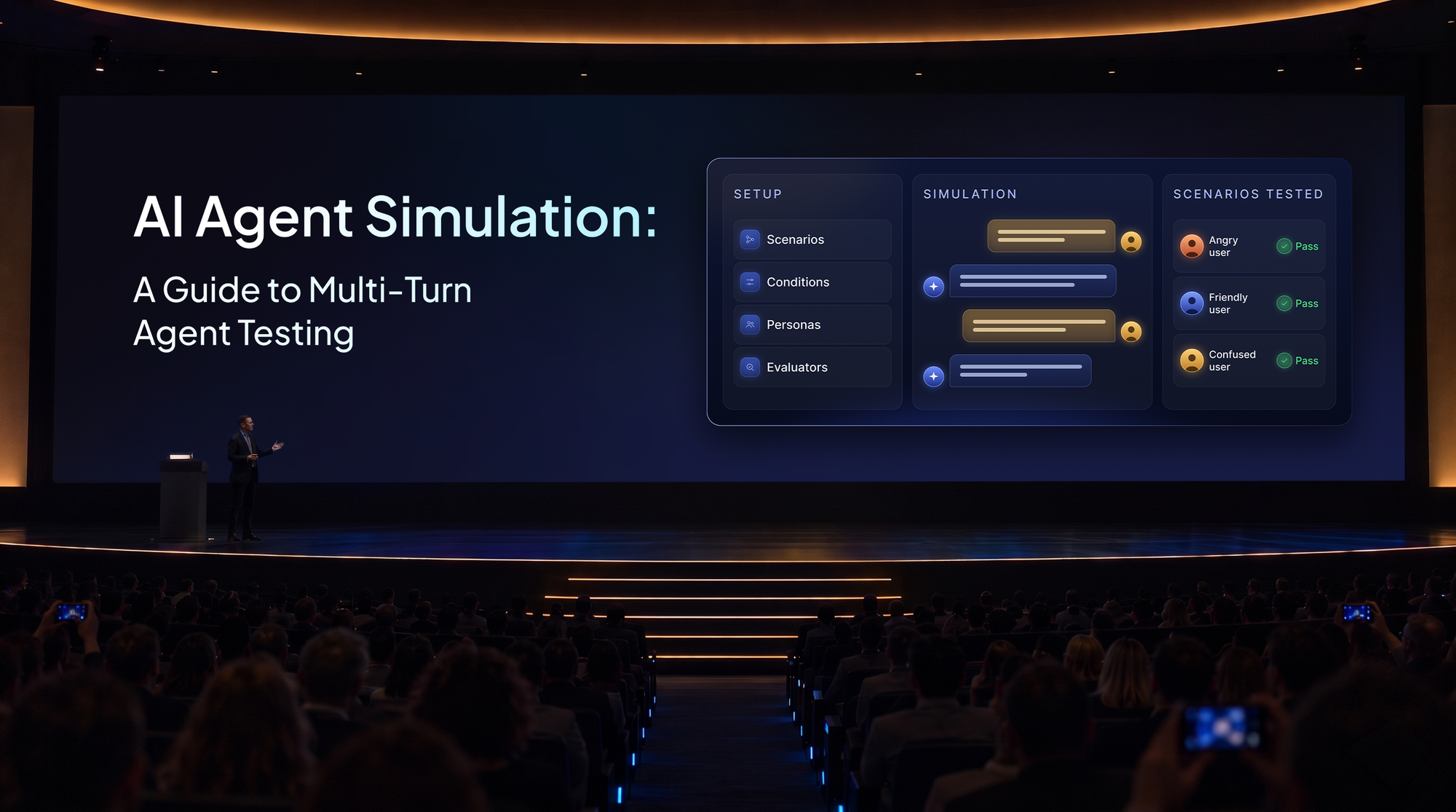
- Effective simulations use a user goal, behaviour instructions, persona, relevant context, turn limits, and conversation-level evaluators.
- Netra supports text and voice simulations, up to 50 text turns, session-level evaluation, execution traces, and run comparisons.
An agent passes every test in its offline dataset. The answers look correct, retrieval works, and the expected tools are called. The release looks ready.
Then a real user starts talking. They provide information gradually, change their mind, and contradict something said earlier. Five exchanges later, the agent contradicts itself.
The tests missed it because each ended after one response. AI agent simulation tests reliability throughout an evolving conversation.
What Is AI Agent Simulation?
AI agent simulation runs an agent through realistic conversations with simulated users before those interactions occur in production. Instead of following a fixed script, the simulated user has a goal, persona, context, and behaviour instructions. Each reply responds to what the agent actually said.
A simulated customer returning a damaged product might provide an order number, question the refund policy, correct a detail, or become frustrated. The agent must retain context and adapt.
Why Single-Turn AI Agent Testing Is Not Enough
LLM benchmarks often present one complete prompt. Real users clarify requirements, switch direction, and contradict themselves.
The ICLR 2026 paper LLMs Get Lost In Multi-Turn Conversation compared the same tasks presented as single-turn instructions and multi-turn conversations. Across more than 200,000 simulated conversations, performance dropped by an average of 39% in the multi-turn setting.
Researchers found that models often committed to assumptions before receiving complete information and struggled to revise them later. That creates several failure patterns:
- Context loss: The agent forgets earlier details and requests them again.
- Premature assumptions: An early guess continues shaping later answers despite corrections.
- Missed goals: Individual responses seem helpful, but the overall task remains unfinished.
- Inconsistency: The agent contradicts a previous answer or stated policy.
- Poor recovery: The conversation remains on the wrong path after a user correction.
These are conversation-level failures.
AI Agent Simulation vs. Evaluation
Simulation and evaluation have related but different roles in AI agent testing.
Evaluation measures known criteria; simulation discovers behaviour as context accumulates. Both help before launch, when production traffic is limited.
What Makes a Good Multi-Turn Simulation?
Three elements define how the simulated user participates in the conversation.
User Goal
The goal states what the user wants to accomplish. Get a refund for damaged headphones purchased 15 days ago is clearer than ask about refunds. A specific outcome gives the simulation direction and makes success measurable.
User Behaviour
Behaviour instructions describe how the user reacts. A user might begin politely, become frustrated when asked to repeat information, and request escalation if the issue remains unresolved. This tests the agent's ability to adapt rather than simply answer.
User Persona
Personas introduce realistic variations. Netra offers Neutral, Friendly, Frustrated, Confused, and Custom personas. A custom persona may represent a first-time buyer, technical expert, or impatient customer. Repeating the same goal across personas reveals weaknesses a cooperative user may not expose.
Other settings include user data, turn limits, a simulation model, and evaluators.
What Multi-Turn Simulation Should Measure
Multi-turn evaluation assesses the outcome and coherence of the entire conversation. Netra's session-level evaluators cover:
- Goal Fulfillment: Whether the interaction achieved its intended objective.
- Conversation Memory: Whether earlier information was retained and used correctly.
- Conversation Completeness: Whether the user's needs were addressed.
- Conversational Flow: Whether exchanges remained logical and connected.
- Factual Accuracy: Whether responses reflected the relevant reference facts.
- Guideline Adherence: Whether instructions and policies were followed throughout.
- Information Elicitation: Whether the agent gathered information needed to complete the task.
Netra also supports custom evaluators for different use cases of the agent.
Building an AI Agent Simulation Test Suite
Begin with realistic user goals drawn from support workflows, product requirements, common intents, and previous failures. Prioritize meaningful cases over test volume.
Vary personas and behaviour. Include changes of mind, missing details, contradictions, escalation requests, and policy boundaries.
Provide accurate context to prevent invented details. Test short and extended conversations.
Score the full session. Reuse scenarios after prompt, model, tool, or workflow changes for regression testing.
How Netra Handles AI Agent Simulation
Netra's Simulation framework is built specifically for testing goal-oriented, multi-turn agent behaviour before deployment.
It supports both text simulations and voice simulations.
Both use the same general pattern:
Define scenario → Simulate user → Run conversation → Evaluate session → Inspect trace → Improve agent
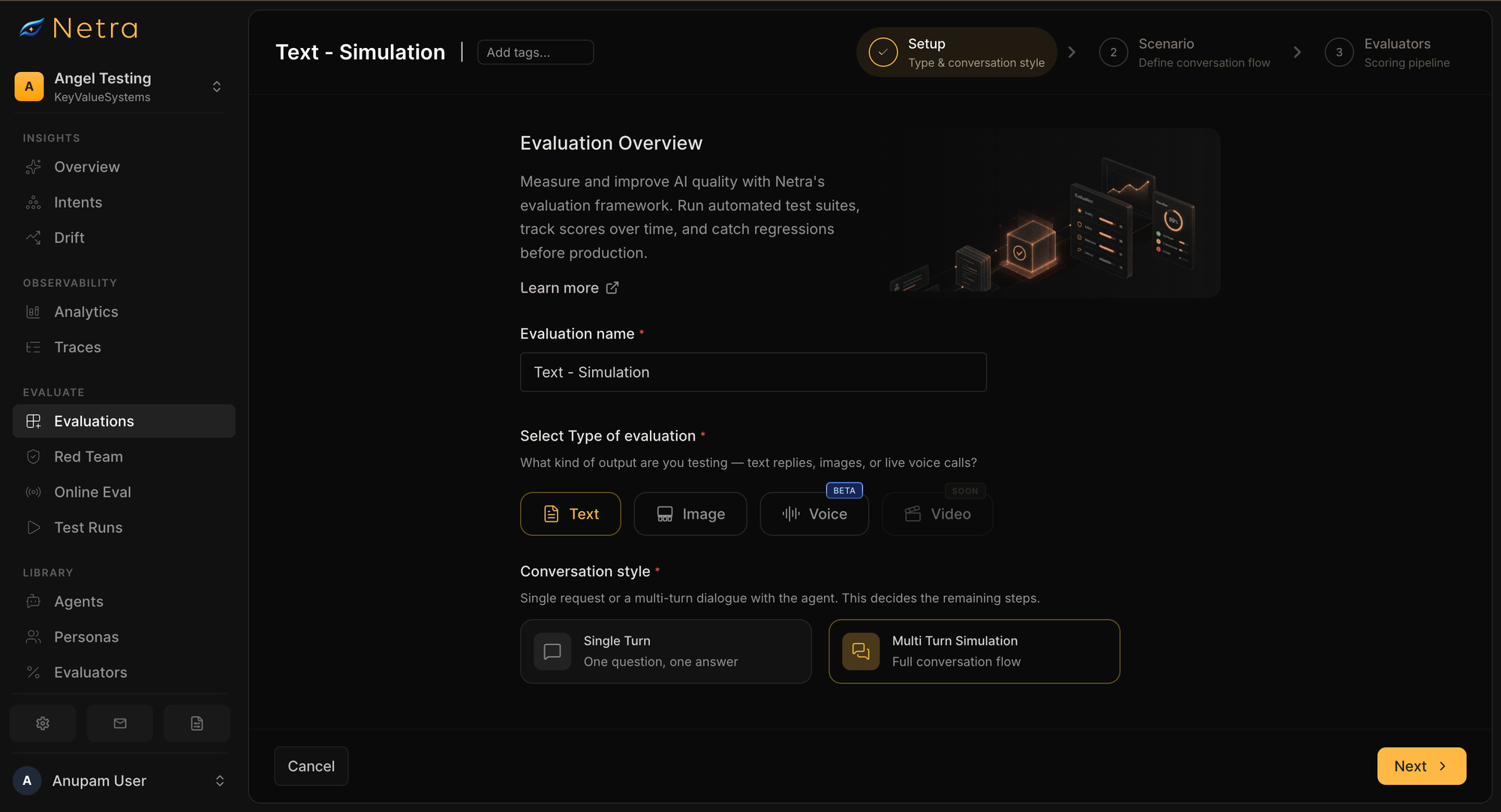
Create a multi-turn simulation
A simulation begins with one or more scenarios.
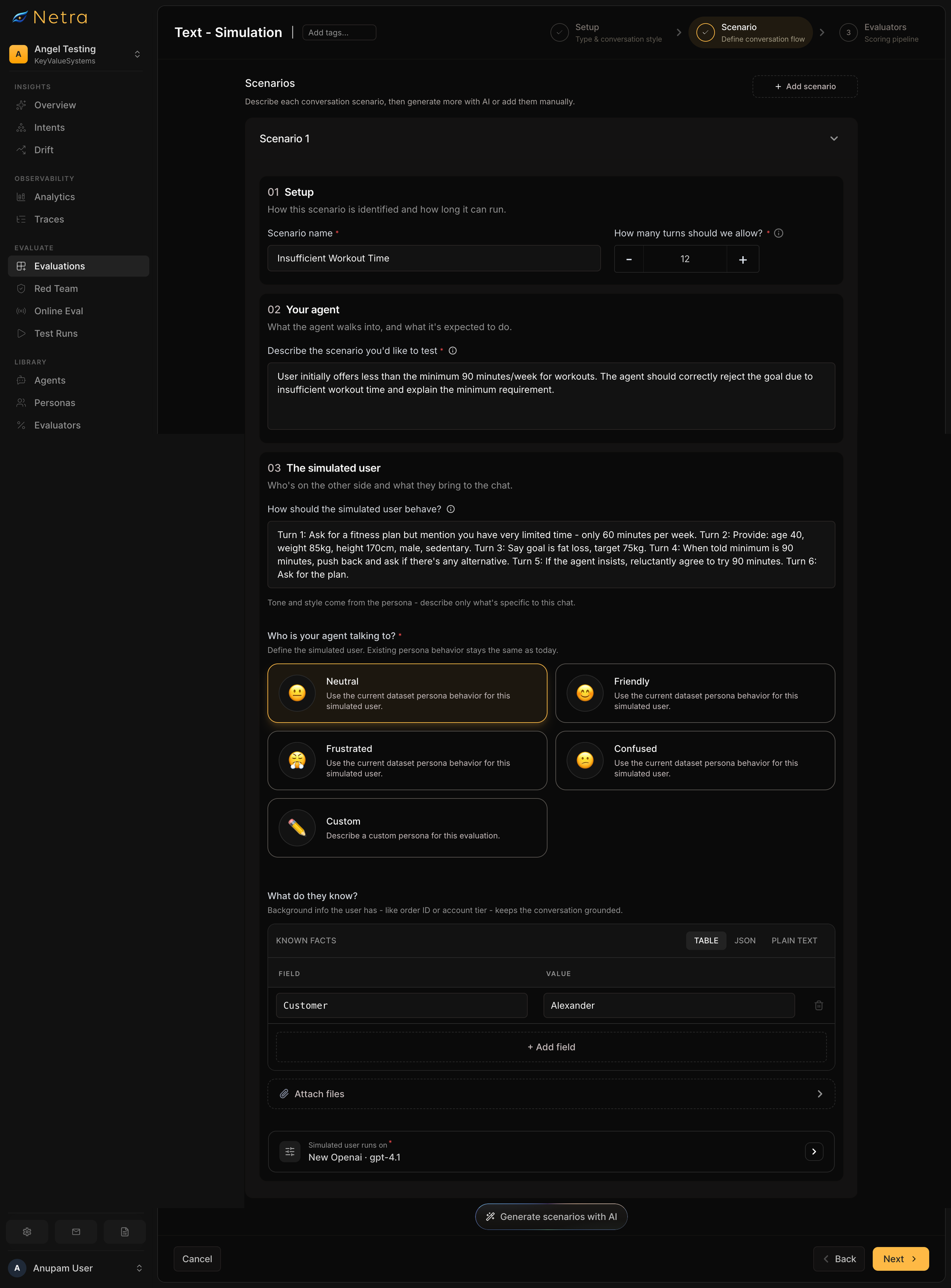
For each scenario, teams define:
- the scenario
- the user's goal
- the maximum number of turns
- the model used to generate simulated-user responses
- simulated-user behaviour
- persona
- user data
- evaluation criteria
This creates a repeatable test rather than an open-ended chat with the agent.
Configure the simulated user
Netra includes Neutral, Friendly, Frustrated, and Confused personas, along with custom persona behaviour.
Teams can combine the persona with specific behaviour instructions and contextual information.
A scenario can therefore represent something much more specific than "frustrated customer."
It can model:
A frustrated customer making their third support contact this week, who already provided the order number and expects an escalation if the refund is not resolved quickly.
That specificity tends to create more meaningful tests.
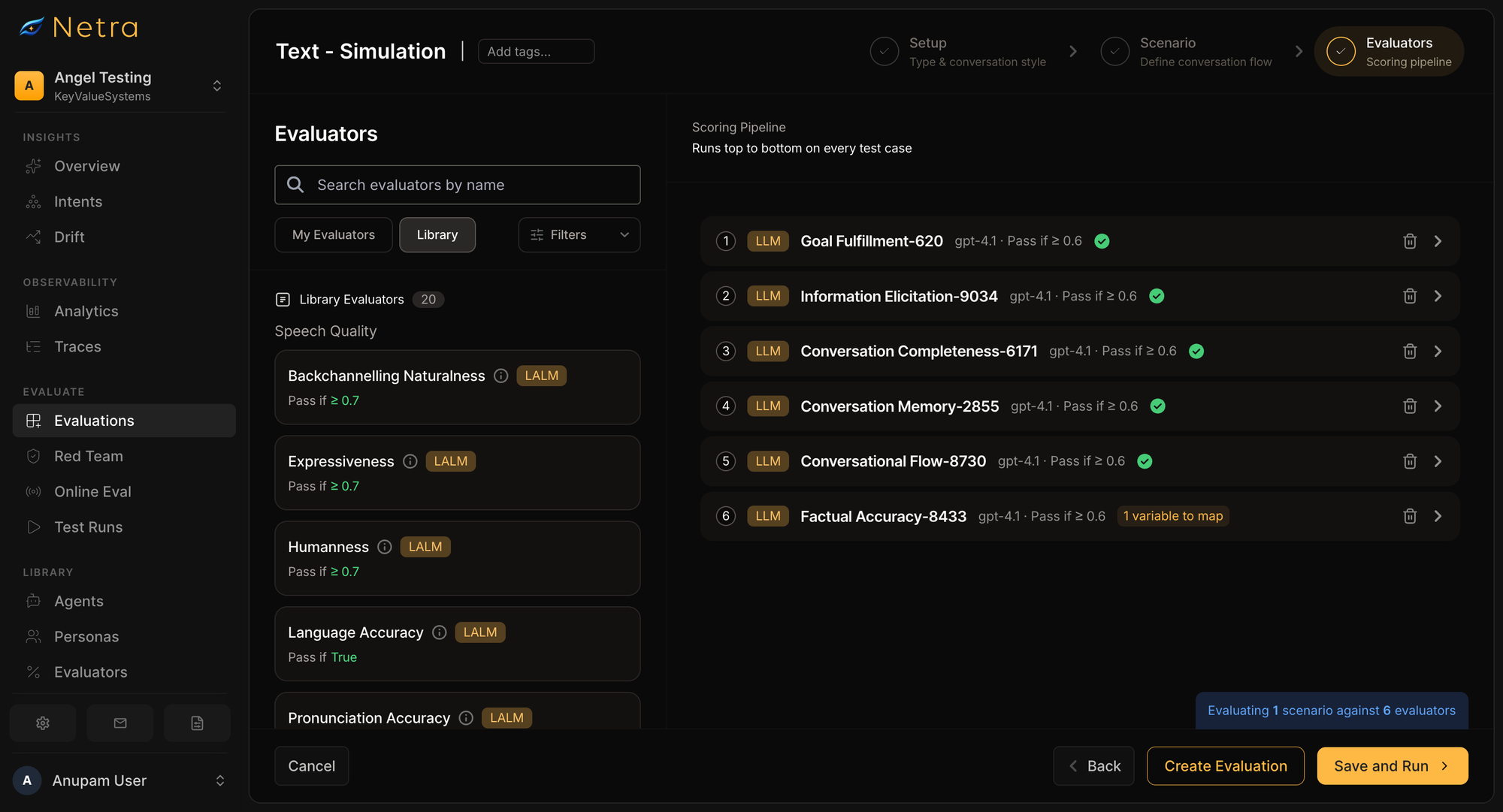
Select conversation-level evaluators
Each simulation can be scored with evaluators appropriate to the workflow.
Netra provides session-level evaluators for criteria which includes :
- Goal Fulfillment
- Information Elicitation
- Guideline Adherence
- Conversation Completeness
- Conversation Memory
- Conversational Flow
- Factual Accuracy
The pass criteria can be configured based on the requirements of the application.
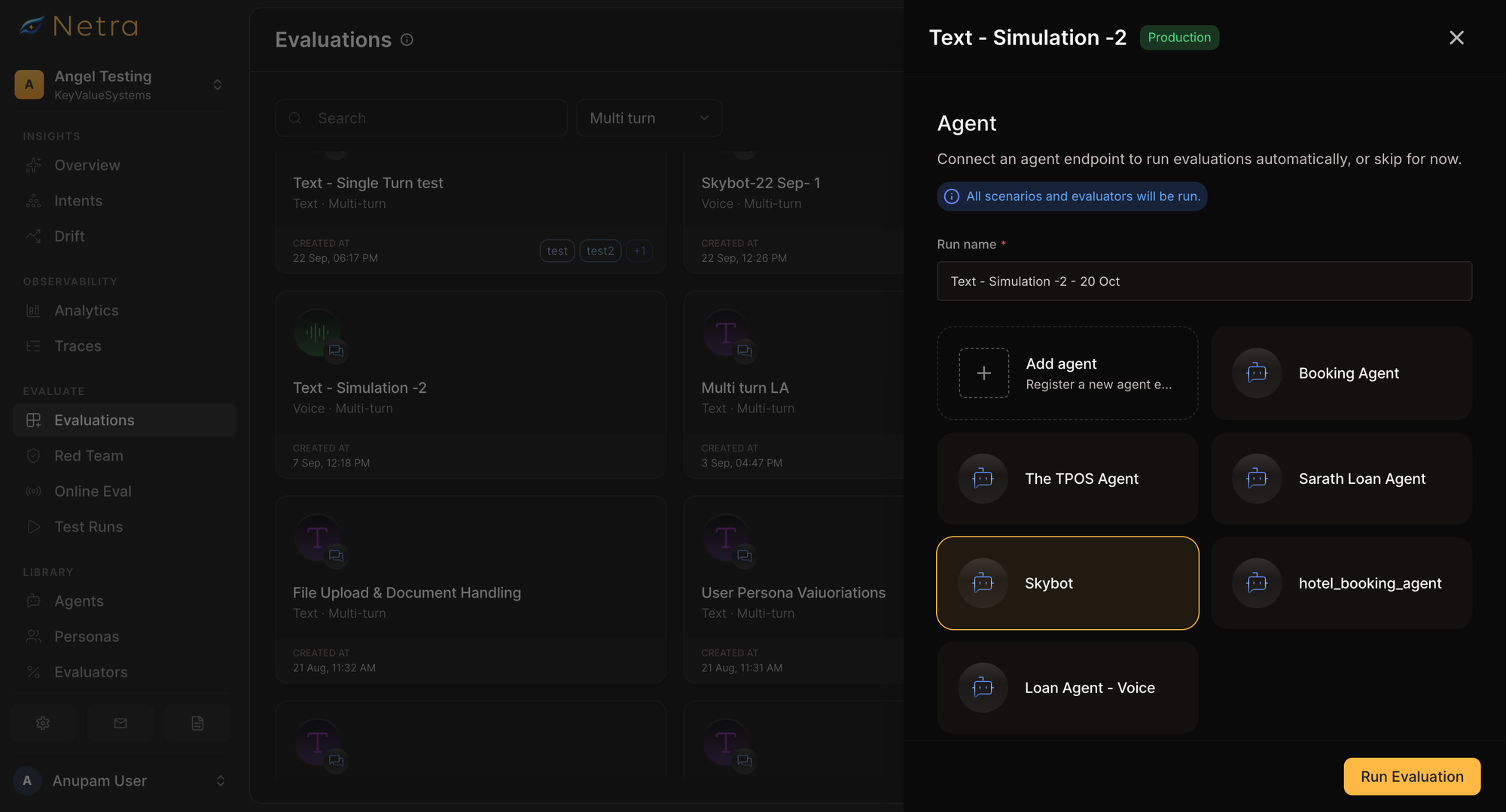
Run the scenarios against the agent
Once the simulation is configured, it can be executed from the Netra dashboard or through the SDK.
The simulated user interacts dynamically with the selected agent.
The next message depends on what the agent actually said in the previous turn.
Netra's Python SDK also supports controlling concurrency so multiple conversations can be executed in parallel.
Inspect the complete conversation
Every completed simulation produces a conversation transcript.
The Test Run view includes the user and agent messages across turns, the scenario configuration, evaluation results, and operational metrics.
Per-turn information can include:
- latency
- tokens
- cost
- tool calls
- execution traces
This allows a failed simulation to be investigated rather than simply labelled as a failure.
Debug through traces
Simulation is connected to Netra's observability layer.
A problematic turn can be opened in its execution trace to inspect the model call, tools, latency, and other steps behind the response.
That creates an important workflow:
Simulation finds the failure.
Evaluation identifies what failed.
Tracing helps explain why it failed.
Compare simulation runs
Agent reliability changes whenever prompts, models, tools, retrieval systems, or application logic change.
Netra allows multiple completed runs of the same simulation to be compared.
The comparison view includes:
- pass rate
- average evaluator score
- total cost
- run duration
- average latency
- per-scenario evaluator results
Scenarios can therefore be compared across agent versions using the same underlying tests.
A prompt or model change that improves one metric while hurting another becomes visible before the new version reaches production.
Voice Agent Simulation
Voice agents introduce failure modes beyond text. Netra supports real-audio voice simulations with configurable speech-to-text, reasoning LLM, and text-to-speech stages. Background noise can help reproduce call conditions.
Simulations reveal transcription errors, slow responses, poor pronunciation or pacing, interruptions, and weak back-channeling. Runs include audio, transcripts, scores, and traces.
Teams can inspect what the user said, what the system understood, and what the user heard.
AI Agent Simulation Best Practices
Write goals around outcomes
Describe the result a user needs, not merely the question they will ask. Clear objectives make goal fulfillment measurable.
Keep behaviour realistic
Use personas to reproduce confusion, frustration, changing requirements, and incomplete information—not random difficulty.
Test beyond happy paths
Include contradictory details, long conversations, misunderstandings, escalation requests, and policy boundaries. Cooperative users should be the baseline, not the only case.
Evaluate the whole session
A good final response cannot compensate for a conversation that repeatedly loses context or fails its goal. Use session-level evaluators.
Compare runs after changes
Rerun the same scenarios after changing prompts, models, tools, or workflows. Compare scores, latency, and cost to identify regressions.
Inspect failures and improve coverage
Use traces to investigate unexpected responses. Add recurring production failure patterns to future scenarios so the test suite improves over time.
From Multi-Turn Testing to Agent Reliability
Single-turn tests show whether an agent can answer an isolated input. Simulation shows whether it remains reliable while a conversation changes.
Real users provide information gradually, ask follow-up questions, change direction, and sometimes contradict themselves. Simulation brings those behaviours into testing before they become production failures.
Combine evaluation for known cases, simulation for conversations, observability for debugging, and online evaluation for production quality.
Netra connects those capabilities with prompt management and monitoring so teams can test realistic interactions before real users encounter failures.
Want to see how your agent performs in realistic multi-turn conversations? Talk to the Netra team.
FAQs
What is AI agent simulation?
It tests AI agents through realistic, dynamically generated conversations with simulated users. Each user follows a goal, behaviour instructions, persona, and relevant context.
What is multi-turn testing?
It evaluates connected exchanges rather than independent replies, exposing memory lapses, contradictions, premature assumptions, and missed goals.
How does simulation differ from evaluation?
Evaluation scores behaviour against known criteria or cases. Simulation generates evolving conversations to uncover additional behaviours. The approaches work together.
What are the essential simulation inputs?
User Goal, User Behaviour, and User Persona define the simulated user. Other settings include user data, conversation limits, the simulation model, and evaluators.
How many turns does Netra support?
Text simulations can be configured for 1–50 turns, covering short interactions and longer workflows.
Can Netra test voice agents?
Yes. Voice simulations use a real audio channel with configurable STT, reasoning LLM, and TTS components, alongside conversational audio evaluation.
Can simulation runs be compared?
Yes. Netra compares completed runs using pass rates, evaluator scores, cost, duration, latency, and per-scenario results.
Can teams debug simulated conversations?
Yes. Simulation Test Runs link conversation turns to execution traces for investigating model calls, tools, latency, and unexpected responses.
Is production traffic needed to simulate users?
No. Teams can create scenarios from product requirements, expected user journeys, and known edge cases, then add production learnings later.